The FIFINE AmpliGame A8 is a USB condenser microphone designed for gaming, streaming, calls, and home recording, with hands-on controls and a compact desktop setup.
This FIFINE AmpliGame A8 USB Gaming Condenser Microphone review looks at who benefits from its monitoring, mute, and noise-control accessories, and where its fixed desktop format may be limiting.
FIFINE AmpliGame A8 Review Summary
The quick verdict
2,000+ ratings
Read Amazon ReviewsFIFINE AmpliGame A8 USB Microphone
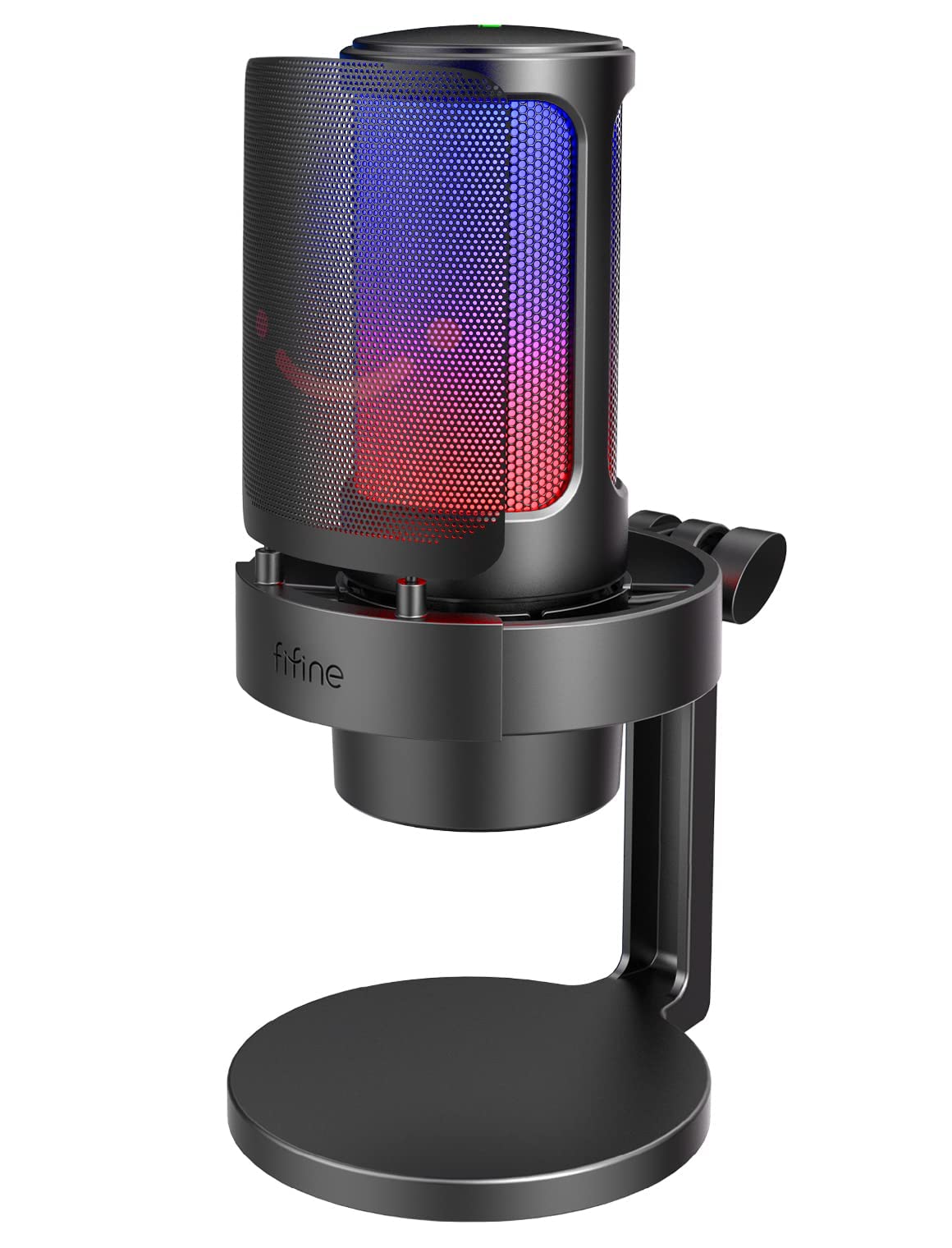
A practical USB desktop mic for gamers and new creators who want touch mute, headphone monitoring, adjustable gain, and configurable RGB lighting.
- USB condenser microphone with a cardioid pickup pattern for desktop voice capture.
- Headphone jack and gain knob support direct listening and manual mic-volume adjustment.
- One-tap touch mute provides a quick way to silence the microphone.
- Three RGB lighting modes display up to nine colors, selectable using the RGB control button.

Pros
- Useful physical controls let you adjust gain, monitor through headphones, and mute without relying on computer hotkeys.
- The included pop filter and shock mount address two common distractions in close desktop voice recording.
Consider before buying
- The design is built around close desktop use, with a suggested recording distance of 6–12 inches; check that this position is comfortable for your desk and speaking habits.
- The described setup centers on the included base stand, so buyers wanting a different mounting arrangement should confirm that it suits their workspace before choosing.
Read the full review summary
The A8 combines a cardioid pickup pattern with a condenser capsule, a headphone jack for monitoring, and a gain knob for adjusting mic volume.
Its pop filter and compact shock mount are designed to help manage plosive sounds and vibrations, while a touch mute control offers a quick way to silence the mic during a session.
It suits PC and Mac users, PS5 players, and beginner creators who want a straightforward USB mic with visible RGB customization and a supplied desktop stand.
The controls make it easier to adjust and monitor audio at the desk; buyers who need a more flexible recording setup should first consider whether the suggested 6–12-inch recording distance and included stand fit their space.
The buying factors
FIFINE AmpliGame A8 Scorecard
Editorial scores reflect listed features and buyer fit; they are not laboratory measurements or customer ratings.
Everyday controls
A gain knob, touch mute, and headphone jack put common adjustments within reach during recording or play.
Setup simplicity
The product is described as plug-and-play for PC, Mac, and PS5, which suits a direct USB desktop setup.
Noise-management accessories
A pop filter and compact shock mount address plosives and some desk or handling vibration, though placement still matters.
Recording flexibility
The cardioid pattern and suggested 6–12-inch range suit close desktop voice use, while the included stand defines the basic setup.
Lighting customization
Three lighting modes offer up to nine RGB colors, with a control button for selecting a mode or color.
Gaming and creator fit
Its monitoring and mute controls, USB connection, and desktop accessories align well with gaming chat, streaming, and casual recording.
Key Features and Specifications of FIFINE AmpliGame A8
- USB condenser microphone with a cardioid pickup pattern for desktop voice capture.
- Headphone jack and gain knob support direct listening and manual mic-volume adjustment.
- One-tap touch mute provides a quick way to silence the microphone.
- Three RGB lighting modes display up to nine colors, selectable using the RGB control button.
- External black metal pop filter is included to soften plosive sounds.
- Compact shock mount is designed to dampen vibration from desk contact or nearby handling.
- Includes a desktop base stand with an adjustable thumbscrew for changing recording position; described for PC, Mac, and PS5 use.
Pros and Cons of FIFINE AmpliGame A8
Pros
- Useful physical controls let you adjust gain, monitor through headphones, and mute without relying on computer hotkeys.
- The included pop filter and shock mount address two common distractions in close desktop voice recording.
- RGB modes can be tailored to a gaming setup without being required for the microphone's core function.
- Plug-and-play positioning is aimed at users who want a simple desktop setup for gaming, calls, or recording.
Consider before buying
- The design is built around close desktop use, with a suggested recording distance of 6–12 inches; check that this position is comfortable for your desk and speaking habits.
- The described setup centers on the included base stand, so buyers wanting a different mounting arrangement should confirm that it suits their workspace before choosing.
- RGB lighting adds visual customization, but it may be unnecessary for users focused only on voice capture.
Who Should Buy FIFINE AmpliGame A8?
Good fit
Consider the A8 if you want a desk microphone for gaming chat, streaming, video calls, or beginner voice recording and value quick access to mute and gain controls.
The headphone jack is useful when you want to listen while adjusting mic volume, and the pop filter and shock mount provide practical starting accessories for a close-mic setup.
It is a good fit for people who want a visually styled microphone that connects directly to a PC, Mac, or PS5.
Before buying, think through where the stand will sit and whether you can keep the mic within the suggested 6–12-inch recording range.
Who should skip it
Look elsewhere if your setup depends on a particular mounting arrangement or recording position that the included desktop stand cannot accommodate. Confirm the physical layout you need before choosing.
If you do not care about RGB and mainly want a mic for distant or room-wide pickup, the A8's close desktop orientation may not match your use as naturally.
FIFINE AmpliGame A8: How Its Desktop Features Fit
Controls that work during a session
The A8 puts gain adjustment and mute on the microphone itself, which can be handy when a game, call, or recording is already underway.
Its headphone jack gives you a way to monitor audio while making adjustments; the product description does not specify additional monitoring controls, so consider whether this basic arrangement covers your workflow.
Close voice capture and noise management
The cardioid pattern is intended to focus on speech in front of the mic and reduce much of the fan or vent noise from a PC tower.
A close position can also make speaking level more consistent, while the included pop filter is designed to soften plosives and the shock mount to dampen vibration.
These accessories help with specific sources of unwanted sound, but they do not eliminate the need to position the microphone thoughtfully.
A desktop setup with a visual accent
The supplied base stand and adjustable thumbscrew support positioning on a desk, and RGB controls let you choose among three modes and up to nine colors.
That combination will appeal to users who want the microphone to be part of a gaming setup. Buyers with limited desk room or a preferred mounting method should check that the stand's placement works before committing.
Who gets the most from the A8
The A8's strongest fit is a user who wants an uncomplicated USB microphone for close-range gaming, calls, or entry-level content creation.
Its feature mix favors accessible controls and included noise-management accessories over a highly configurable recording system, making the intended use and desk arrangement central to the decision.
Alternatives to FIFINE AmpliGame A8
No alternative model is recommended here. Compare the design and features that matter to your routine before choosing another option.
Is FIFINE AmpliGame A8 Worth It?
The FIFINE AmpliGame A8 USB Microphone is worth considering for desktop users who want straightforward USB voice capture, on-mic gain and mute controls, headphone monitoring, and included accessories for close recording.
Its RGB options add a setup-friendly visual touch, while its cardioid design is aimed at focused speech.
Choose it when the supplied stand and suggested close recording distance work for your space. If your setup calls for a different mounting arrangement or more flexible positioning, confirm those needs before buying.
Your review at a glance
2,000+ ratings
Read Amazon ReviewsFIFINE AmpliGame A8 USB Microphone
A practical USB desktop mic for gamers and new creators who want touch mute, headphone monitoring, adjustable gain, and configurable RGB lighting.
- USB condenser microphone with a cardioid pickup pattern for desktop voice capture.
- Headphone jack and gain knob support direct listening and manual mic-volume adjustment.
- One-tap touch mute provides a quick way to silence the microphone.
- Three RGB lighting modes display up to nine colors, selectable using the RGB control button.